Workcraft in Action
Build powerful business applications with drag-and-drop simplicity. No coding required.
AI AppGen
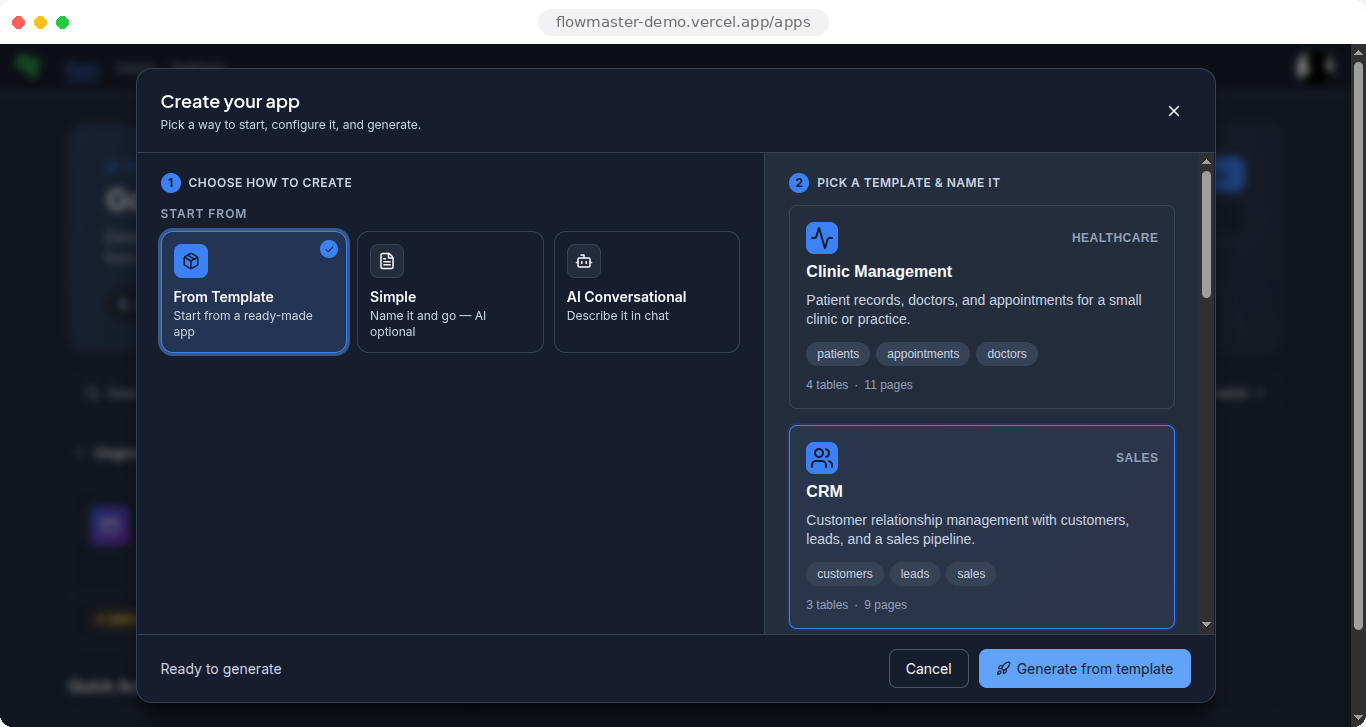
Generate complete applications from natural language prompts. Describe what you want to build, and Workcraft creates fully functional apps with forms, workflows, and data models in seconds.
AI Agents Builder
Create intelligent AI agents that can analyze data, make decisions, and take actions autonomously. Build conversational AI, automation agents, and intelligent assistants with no-code simplicity.
Visual App Builder
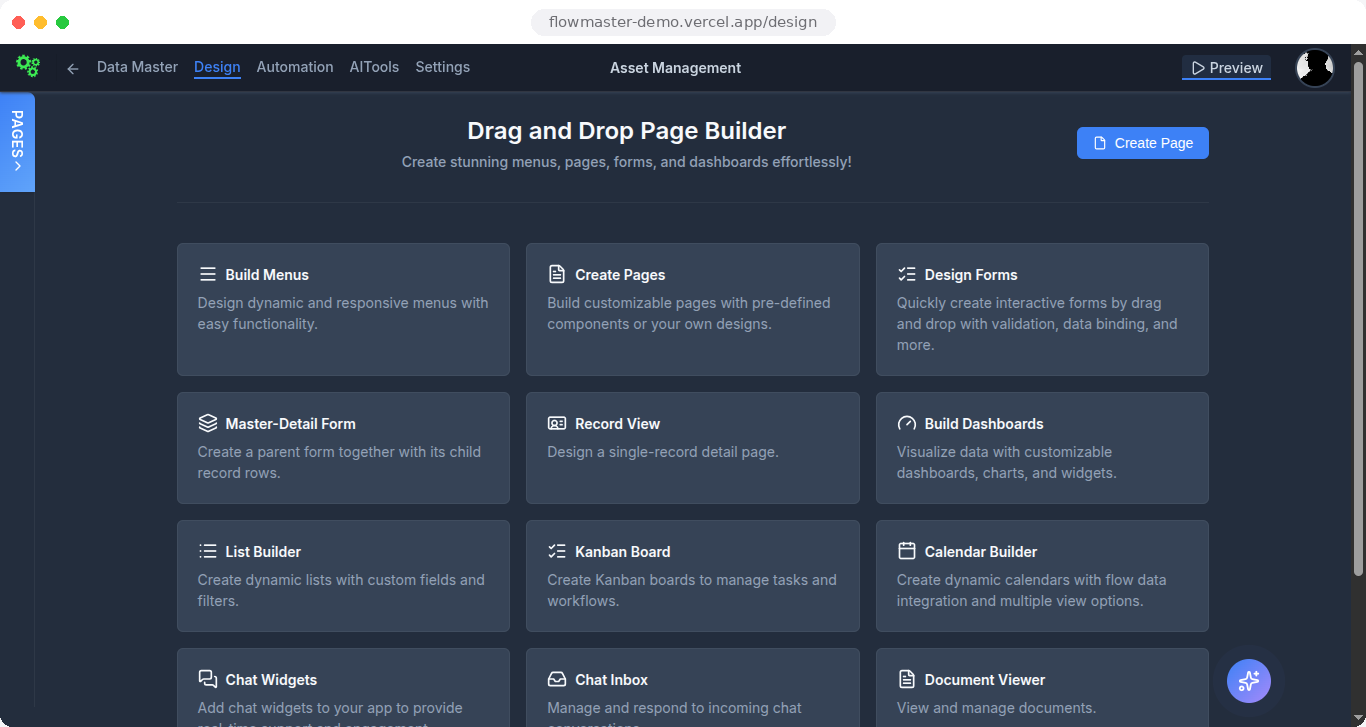
Drag-and-drop interface for building complete applications. Create forms, lists, dashboards, and custom pages with real-time preview. No coding required—just drag, drop, and deploy.
Workflow Automation
Design and execute complex business processes with visual flow builder. Schedule tasks, automate approvals, trigger actions, and integrate with external systems. Enterprise-grade automation for every team.
Data Integration Hub
Connect to 20+ data sources: MongoDB, MySQL, PostgreSQL, SQL Server, REST APIs, Google Sheets, Salesforce, Stripe, HubSpot, Zendesk, and more. Unified data access across your entire stack.
Enterprise Security
SOC 2 compliant with role-based access control, SSO/SAML, audit logs, IP whitelisting, and data encryption. GDPR, HIPAA, and CCPA ready with complete tenant isolation for multi-tenant deployments.
How Workcraft Compares
See how we stack up against the competition
The real product.
Not a mockup.
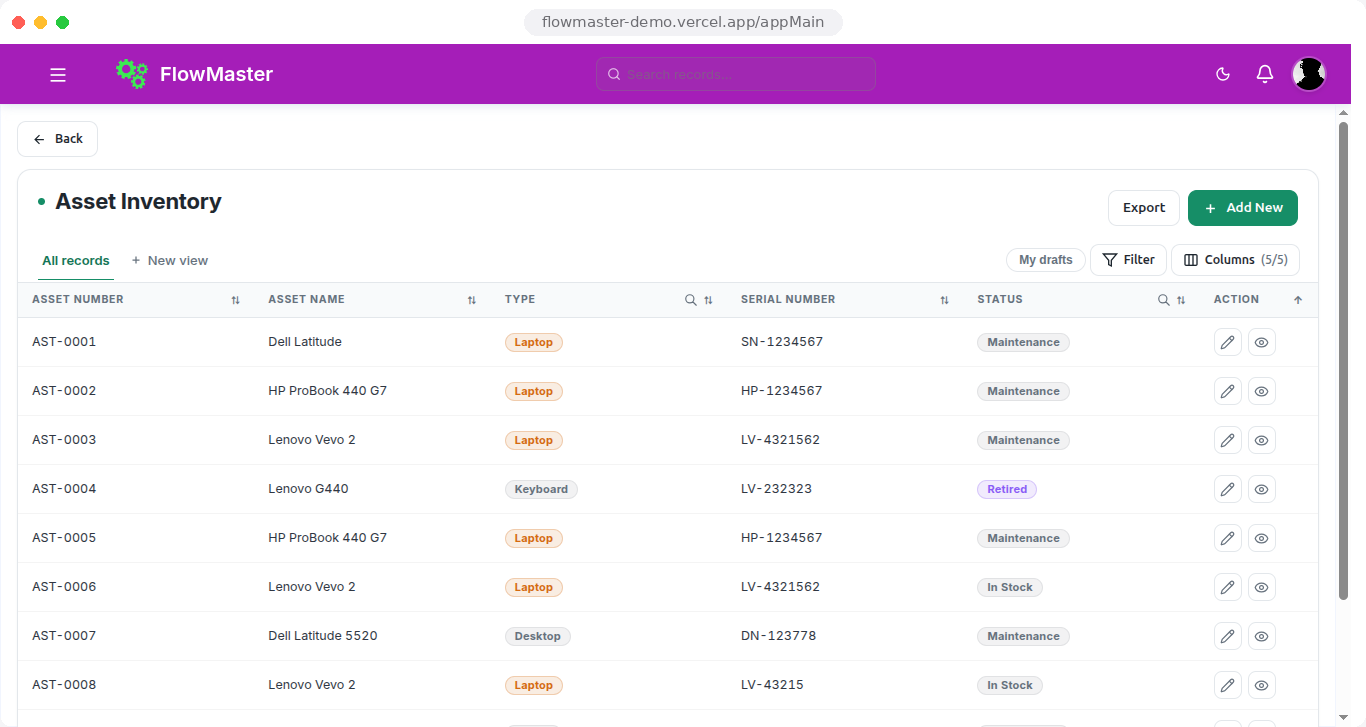
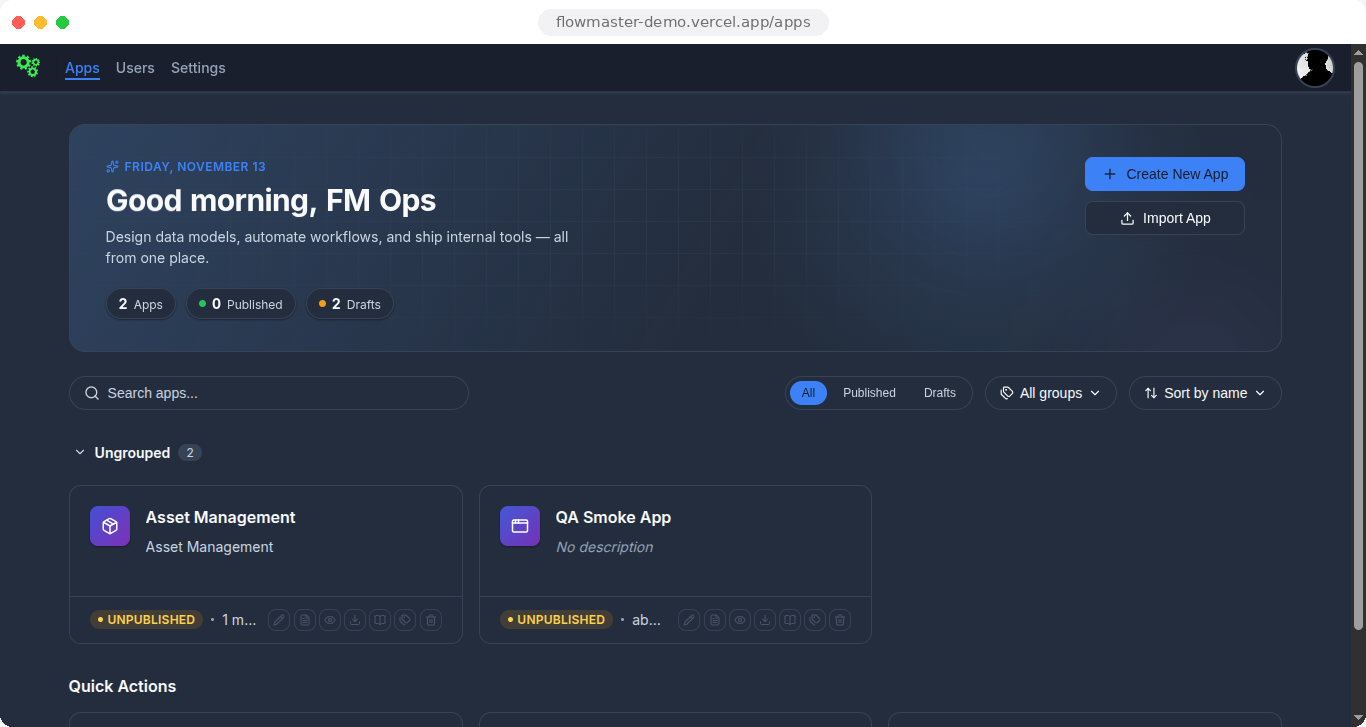
Every image below is a live screen from the Workcraft demo workspace — the same UI your team gets on day one.
Built for Every Team
The platform for every use case—from AI-powered workflows to data-driven dashboards.
For AI & LLMs
Build agents, workflows, and apps with the power of AI. Create content moderation tools, document processing workflows, custom agents, and model performance monitors.
- AI Agents Builder
- Content Moderation
- Document Processing
- Model Monitoring
For Data Teams
Transform raw data into actionable insights. Build apps that read and write from your data sources using SQL. Create interactive dashboards, admin panels, and data quality monitoring systems.
- SQL-Based Dashboards
- Data Quality Monitoring
- Customer Insights Views
- Experiment Tracking
For Operations Teams
Streamline processes and reduce manual work. Build software solutions that were previously out of reach—from HR calibration tools to inventory management systems and custom workflows.
- HR Management Tools
- Inventory Management
- Custom Workflows
- Process Automation
For Support Teams
Drive customer success with effective tools. Build internal software to triage tickets, track common issues, and manage knowledge bases—all without engineering bottlenecks.
- Ticket Triage Systems
- Knowledge Base Management
- AI-Powered Support
- Audit & Compliance
Trusted by leading companies
See Workcraft in Action
Watch how modern teams ship AI-native software from prompt to production
Visual Flow Builder for AI Agents & Automation
The real canvas — wire AI agents, conditions, sub-flows, and data operations by drag and drop
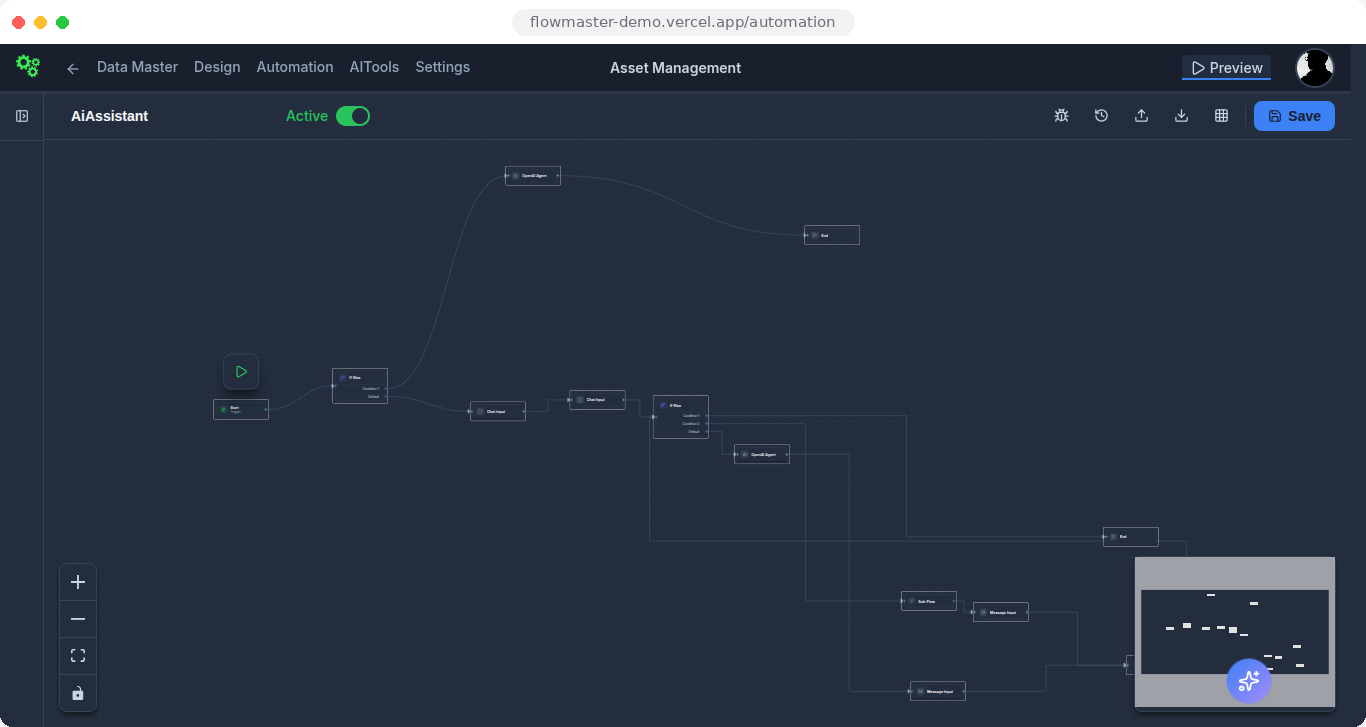
Live screen: the AiAssistant flow in the demo workspace — chat inputs, condition branches, an AI agent, and a sub-flow on one canvas.
MongoDB Operations
Find, Insert, Update, Delete, Aggregate queries
AI Agent Integration
OpenAI, Gemini, Ollama, and more AI providers
Visual Flow Builder
Drag-and-drop nodes, connect with ease
Natural Language Prompt
Describe what you want to build
AI App Generation
Watch Workcraft create your app
Customize & Deploy
Fine-tune and go live instantly
Enterprise-Grade Security & Multi-Tenancy
Built for enterprise with tenant isolation, role-based access control, and comprehensive security features.
SOC 2 Type II
In Progress
GDPR
Compliant
HIPAA
Ready
ISO 27001
Roadmap
CCPA
Compliant
End-to-End Encryption
All data encrypted in transit and at rest using industry-standard encryption protocols.
SSO/SAML Support
Single sign-on with SAML 2.0, OAuth 2.0, and Google OAuth integration for seamless authentication.
Audit Logs
Comprehensive audit trails tracking all user actions, data access, and system changes for compliance.
IP Whitelisting
Restrict access to specific IP addresses or ranges for enhanced network security.
Data Residency
Choose where your data is stored with region-specific deployments and data residency options.
Role-Based Access Control
Fine-grained permissions with custom roles, user groups, and resource-level access control.
Multi-Tenancy
Complete tenant isolation with separate data, users, and configurations. Perfect for SaaS providers and enterprise deployments.
ISOLATIONRole-Based Access
Fine-grained access control with roles and permissions. Secure your applications with JWT authentication and Google OAuth.
SECURITYData Protection
Secure data handling with encrypted connections, password policies, and comprehensive audit trails for compliance.
COMPLIANCEAn End-to-End Platform
Everything you need to build, deploy, and manage enterprise applications.
Page Builder
Drag-and-drop interface for forms, lists, dashboards, and custom pages
Workflow Builder
Visual flow designer with AI-powered generation and scheduling
AI Agents Builder
Create intelligent AI agents with conversational interfaces and autonomous decision-making
Data Sources
Connect to MongoDB, MySQL, PostgreSQL, SQL Server, REST APIs, and Google Sheets
AI Assistant
Generate forms and workflows using natural language prompts
Multi-Tenant
Complete tenant isolation with separate configurations and data
Comprehensive Platform Capabilities
Everything you need to build, deploy, and manage business applications in one platform.
Application Management
Create, edit, duplicate, and manage multiple applications. Import/export functionality and template-based creation.
Automation & Scheduling
Schedule workflows with cron, interval, daily, weekly, and one-time triggers. Real-time execution and monitoring.
AI Agents & Automation
Build intelligent AI agents that can process data, make decisions, handle conversations, and execute complex tasks autonomously.
UI Components
Build headers, footers, menus, and announcements. Customize themes and responsive layouts.
Document Management
View, manage, and organize documents. PDF generation and document viewer integration.
Microsoft Teams
Integrate with Microsoft Teams bot for chat-based interactions and workflow execution.
Why Choose Workcraft
Workcraft's drag-and-drop form builder has revolutionized how we collect and process data. We've built complex forms with validation and data binding in minutes—something that used to take days of development work.
The AI Agents builder is incredible! We've created intelligent assistants that handle customer queries, process documents, and automate complex workflows—all without writing a single line of code.
Multi-tenancy support was a game-changer for our SaaS platform. We can now manage multiple customers with complete data isolation, custom configurations, and role-based access control.
Simple, Transparent Pricing
Choose the plan that works for you. Start with our free tier or scale with our cloud platform.
Starter
Perfect for individuals and small teams getting started
- ✓ Self-hosted deployment
- ✓ Up to 10 users
- ✓ Up to 5 applications
- ✓ Core features
- ✓ Community support
- ✓ 7-day full-access trial, then Free
Cloud Starter
Perfect for growing teams and multi-tenant deployments
- ✓ Hosted cloud platform
- ✓ Multi-tenant ready
- ✓ Up to 50 users
- ✓ Unlimited applications
- ✓ Email support
- ✓ 99.9% uptime SLA
Enterprise
For large organizations with advanced requirements
- ✓ Unlimited users
- ✓ White-label options
- ✓ SSO/SAML integration
- ✓ Dedicated support
- ✓ Custom SLA
- ✓ On-premise deployment
Compare Workcraft vs Competitors
| Feature | Workcraft | Retool | ToolJet | ProcessMaker |
|---|---|---|---|---|
| AI App Generation | ✓ | ✓ | ✓ | ✗ |
| AI Agents Builder | ✓ | ✓ | ✓ | ✓ |
| Self-Hosting | ✓ | ✓ | ✓ | ✓ |
| Multi-Tenancy | ✓ | ✓ | ✓ | ✓ |
| Microsoft Teams Integration | ✓ | ✗ | ✗ | ✓ |
| Self-Hosted Option | ✓ | ✓ | ✓ | ✓ |
| Free Tier Available | ✓ | ✗ | ✓ | ✗ |
| Starting Price | Free | $10/user | Free | Custom |
Developers & Business Teams
One platform that works for both technical and non-technical teams
Code Examples & API Docs
Comprehensive REST API documentation with code samples in multiple languages. Integrate Workcraft into your existing development workflow.
- REST API reference
- Code samples (JavaScript, Python, Java)
- Webhook integration
- SDK libraries
Version Control & CI/CD
Version control your application configurations with Git. Export and import configurations, collaborate with your team, and integrate with CI/CD pipelines.
- Git-based configuration versioning
- Import/export functionality
- CI/CD pipeline integration
- Team collaboration tools
Open Architecture
Built with Spring Boot and Vue.js. Self-host on your infrastructure or deploy to any cloud. Full control over your data and deployments.
- Docker & Kubernetes ready
- On-premise deployment
- Cloud agnostic
- Flexible deployment options
ROI Calculator
See how much time and money your team can save. Calculate your return on investment with our built-in ROI calculator.
- Time-to-value metrics
- Cost savings analysis
- Development time reduction
- ROI projections
No-Code Guarantee
Build powerful applications without writing a single line of code. Visual builders, drag-and-drop interfaces, and AI-powered generation.
- Drag-and-drop builders
- Natural language app generation
- Pre-built templates
- Business user friendly
Success Stories
Learn how teams across industries are using Workcraft to transform their operations. Real case studies from real customers.
- Customer testimonials
- Case studies
- Use case examples
- Best practices
Start Building Your Applications Today
Join teams building powerful business applications without coding. Get a demo workspace — 7 days of full access, then Free.
Request received
Check your inbox for credentials — your demo workspace comes with 7 days of full access, then continues on the Free plan.
Everything You Need to Get Started
Documentation, tutorials, templates, and community resources to help you build faster
Quick Start Guide
Get up and running in minutes with our step-by-step getting started guide.
View Guide →Video Tutorials
Watch step-by-step video tutorials covering all major features and use cases.
Watch Videos →API Documentation
Comprehensive API reference with code examples and integration guides.
View Docs →Template Library
50+ pre-built templates to jumpstart your application development.
Browse Templates →Integration Guides
Step-by-step guides for integrating with popular services and platforms.
View Guides →